This composition makes use of the media container and brings additional details through the usage of paragraphs, optionally to be followed by a link where users can find further information about the content in question.
Anatomy
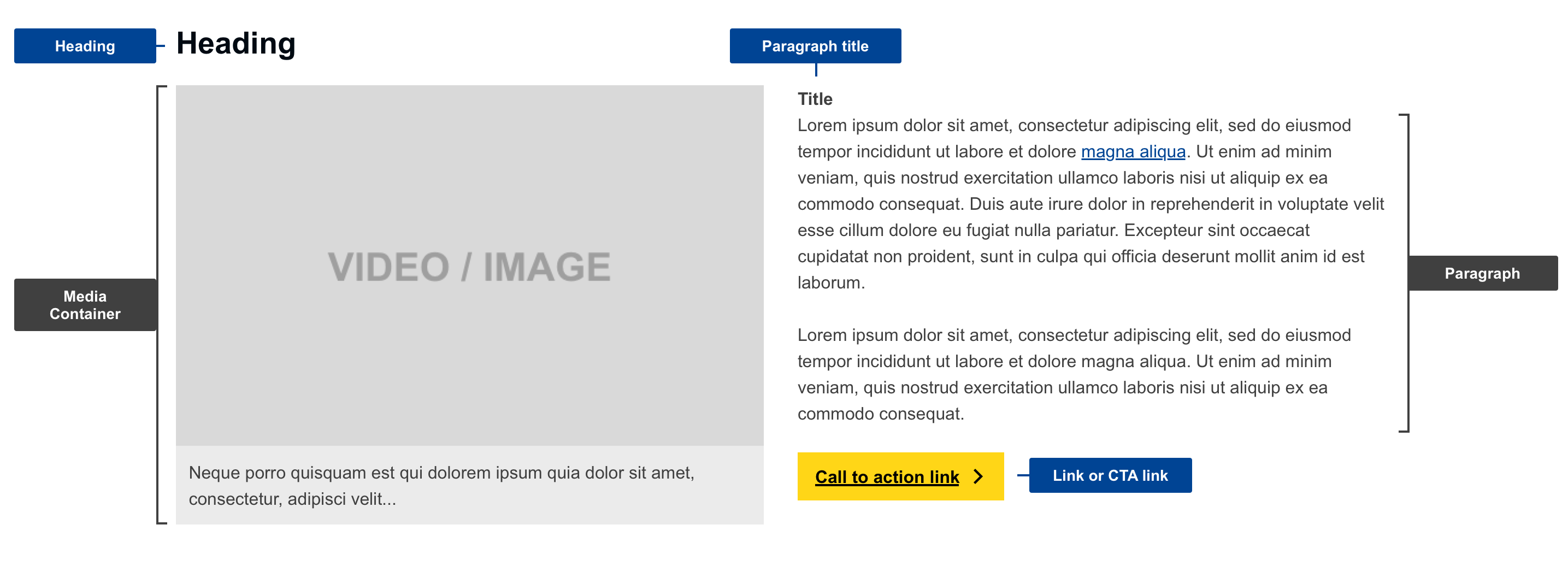
- mandatory
- optional
| Elements | Mandatory | Description |
|---|---|---|
| heading | no | title of the composition |
| media container | yes | a media container is used to display media items (video, audio, image or other data) with an optional caption |
| paragraph title | no | title of the paragraph |
| paragraph | yes | paragraph / simple rich text |
| link / CTA link | no | link to either internal or external source (default label: "Read more", can be overwritten to indicate what CTA or the following system actions) |
Do's
- always place at the top of the page
- always include thumbnails
- select an appropriate image or video thumbnail, that is suggestive, complementary and relevant for the related content
- make sure that the height of the text does not exceed the height of the media container
Don'ts
- don't use a CTA link if the page already contains one
- don't use more than one composition on a single page
- don't choose images which are too complex to be distinguished in thumbnail size
When to use
- whenever there is a need to display a media file with a paragraph
- when a page can benefit from added visual appeal
- when the media file is complementary to the content available on that page
When not to use
- do not use when you only need to display the media without the paragraph, use Media container instead
Exceptions
- harmonised group 2
- placement at the top of the page is optional
- you can use more than one composition per page
- if using links in multiple compositions, keep only the most important link as Call-to-action link (while leaving the rest as regular links)